Đây là bài bí kíp để kết thúc nhánh Android: lấy page source của màn hình đang mở mà không cần tạo thêm một session trong Appium Inspector. Nếu session chưa ổn định, xử lý theo diagnostic ladder của bài trước trước; bí kíp này không hồi sinh được một UiAutomator2 server đã chết.
Tình huống rất quen. Bạn đang chạy test bằng Robot Framework, app đã đi qua một flow dài và đứng đúng màn hình cần lấy locator. Mở Inspector lên, tạo session khác, app bị launch lại hoặc target báo session conflict. Thế là mất luôn trạng thái vừa dắt nó đi qua mười hai bước mới tới nơi.
Trong khi đó session của Robot Framework vẫn đang sống và Appium đã có sẵn endpoint trả XML. Vậy thì gọi thẳng endpoint đó.
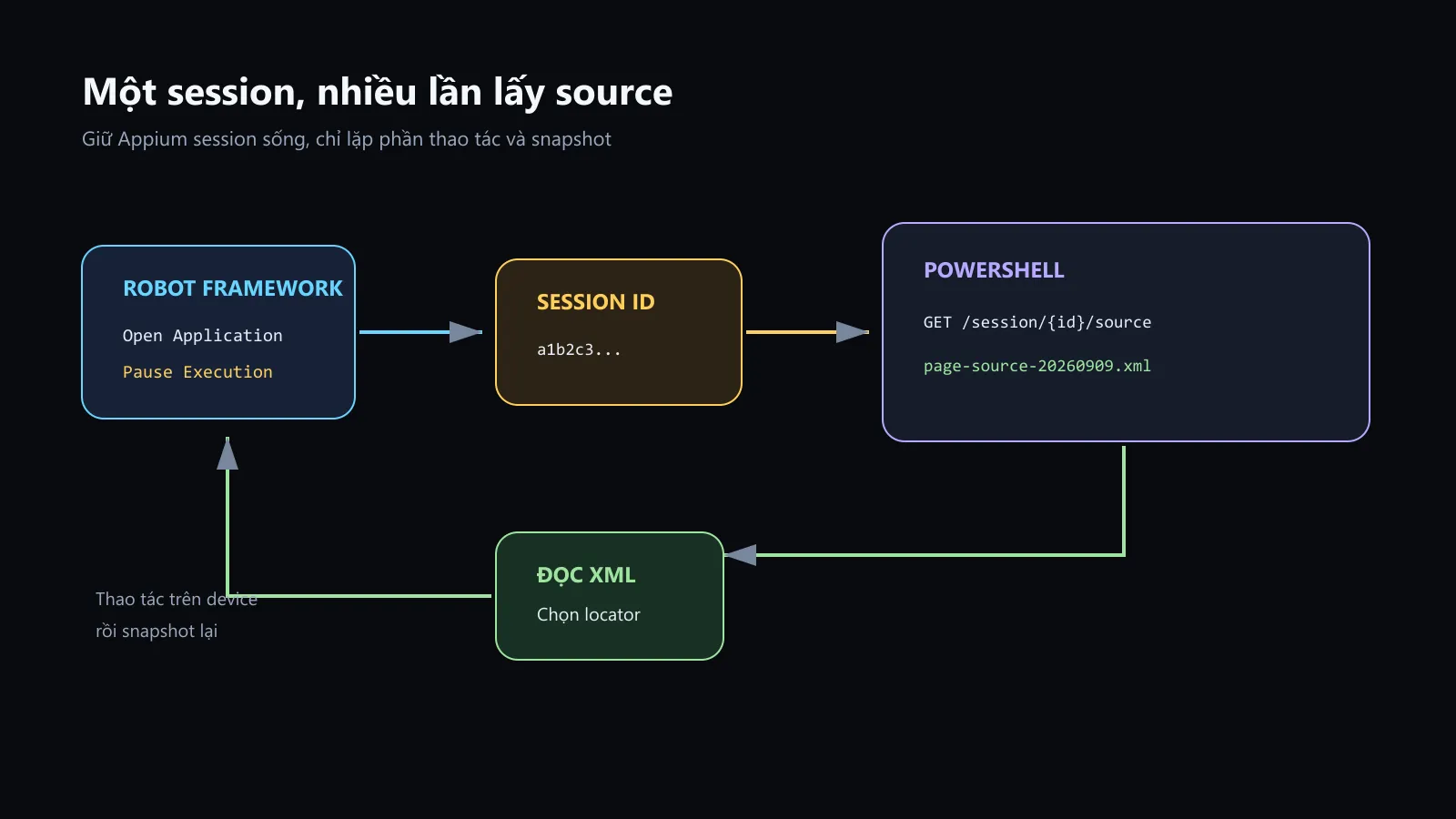
Sơ đồ mình dựng từ flow trong bài. Session ID đi thẳng từ Robot sang PowerShell; không cần bật session discovery và cũng không tạo thêm session để soi UI.
Nói rõ trước: cái gì thực sự nhanh hơn?
Appium Inspector khi refresh source cũng phải yêu cầu driver dựng page source. Gọi thẳng GET /session/{sessionId}/source không làm UiAutomator2 tự nhiên dựng XML nhanh gấp mười.
Phần nhanh hơn là workflow:
- không mở thêm GUI;
- không tạo session mới;
- không launch/reset app lần nữa;
- không tranh target với session Robot đang chạy;
- một lệnh PowerShell tạo ngay file XML để search và diff.
Nói “lấy snapshot nhanh” là đúng. Nói endpoint bí mật làm UiAutomator2 chạy nhanh hơn bản chất của nó thì là chém.
Endpoint chúng ta sẽ dùng
Appium hỗ trợ WebDriver endpoint:
GET /session/:sessionId/sourceResponse có dạng:
{
  "value": "<?xml version=\"1.0\" encoding=\"UTF-8\"?><hierarchy>...</hierarchy>"
}
value mới là XML cần lưu. Nếu bạn ghi nguyên JSON ra file .xml, editor sẽ mở một cục escape quote trông như mì tôm chưa ngâm.
Giữ một session debug sống lâu
Tạo tests/dom_debug.robot:
*** Settings ***
Library       AppiumLibrary    timeout=10s
Library       Dialogs
Variables     variables/android.py
Suite Setup   Mở Session Debug
Suite Teardown    Close All Applications

*** Test Cases ***
Giữ Session Để Lấy Page Source
    ${session_id}=    Get Appium SessionId
    Log To Console    \nAPPIUM_SESSION_ID=${session_id}
    Pause Execution
    ...    Session đang được giữ. Lấy source bằng PowerShell rồi bấm OK để đóng.

*** Keywords ***
Mở Session Debug
    Open Application
    ...    ${APPIUM_URL}
    ...    appium:options=${CAPABILITIES}
Get Appium SessionId lấy ID của driver hiện tại, không phải index mà Open Application trả về. Pause Execution giữ Robot process và session đứng lại trong khi bạn thao tác trên device hoặc gọi HTTP từ terminal khác.
Suite Teardown vẫn đóng session khi test kết thúc. Đừng bỏ teardown rồi để session mồ côi đến lúc Appium timeout; debug có chủ đích khác với quên dọn.
Chạy:
robot --pythonpath . --outputdir results tests\dom_debug.robotTerminal sẽ in:
APPIUM_SESSION_ID=3b9d...exampleGiữ hộp thoại Pause mở trong lúc lấy snapshot.
PowerShell script lấy XML
Tạo tools/Get-AppiumDom.ps1:
param(
    [Parameter(Mandatory)]
    [string] $SessionId,

    [string] $BaseUrl = 'http://127.0.0.1:4723',

    [string] $OutputPath = '.\dom-snapshots'
)

$ErrorActionPreference = 'Stop'

if (-not (Test-Path -LiteralPath $OutputPath)) {
    New-Item -ItemType Directory -Path $OutputPath | Out-Null
}

$base = $BaseUrl.TrimEnd('/')
$endpoint = "$base/session/$SessionId/source"
$timestamp = Get-Date -Format 'yyyyMMdd-HHmmss-fff'
$snapshotPath = Join-Path $OutputPath "page-source-$timestamp.xml"

try {
    $response = Invoke-RestMethod `
        -Method Get `
        -Uri $endpoint `
        -TimeoutSec 60

    if ($null -eq $response.value -or $response.value -isnot [string]) {
        throw 'Appium response does not contain a string value'
    }

    $response.value | Set-Content `
        -LiteralPath $snapshotPath `
        -Encoding utf8

    $resolved = (Resolve-Path -LiteralPath $snapshotPath).Path
    Write-Host "DOM snapshot saved: $resolved"
}
catch {
    $message = $_.Exception.Message

    if ($message -match 'invalid session|404') {
        throw "Session '$SessionId' is no longer active. Get a new ID from Robot Framework."
    }

    throw "Cannot get Appium page source from '$endpoint': $message"
}
Script nhận ba tham số thay vì hard-code:
SessionIdbắt buộc vì nó xác định session đang sống;BaseUrlmặc định trỏ Appium local;OutputPathlà thư mục chứa snapshot, tránh ném XML đầy project root; tên file timestamped được script tạo bên trong thư mục này.
Timestamp có millisecond để bấm liên tiếp không ghi đè file trước. -LiteralPath tránh PowerShell hiểu dấu vuông hoặc wildcard trong đường dẫn. TimeoutSec ngăn terminal chờ vô tận nếu UiAutomator2 đang kẹt.
Chạy trong terminal khác:
.\tools\Get-AppiumDom.ps1 `
    -SessionId 'SESSION_ID_TU_ROBOT'
Mỗi lần chạy sẽ tạo một file mới:
dom-snapshots\page-source-20260908-153045-127.xmlAppium 3 và chuyện /wd/hub
Appium 3 mặc định dùng base path /, nên URL đúng là:
http://127.0.0.1:4723/session/{sessionId}/sourceChỉ khi server được mở như sau:
appium --base-path /wd/hubthì mới truyền:
.\tools\Get-AppiumDom.ps1 `
    -SessionId 'SESSION_ID_TU_ROBOT' `
    -BaseUrl 'http://127.0.0.1:4723/wd/hub'
Thấy tutorial cũ có /wd/hub rồi copy vào Appium 3 mặc định sẽ nhận 404. Server không ghét bạn; bạn đang gõ nhầm cửa của nhà cũ.
Lấy source ngay trong Robot Framework
Nếu không cần thao tác từ terminal ngoài, AppiumLibrary đã có Get Source:
*** Settings ***
Library    AppiumLibrary
Library    OperatingSystem
Library    DateTime

*** Keywords ***
Lưu Page Source Hiện Tại
    ${source}=       Get Source
    ${timestamp}=    Get Current Date    result_format=%Y%m%d-%H%M%S
    ${path}=         Join Path
    ...    ${OUTPUT DIR}
    ...    page-source-${timestamp}.xml
    Create File    ${path}    ${source}    encoding=UTF-8
    Log    Page source saved to ${path}
    RETURN    ${path}
${OUTPUT DIR} là output directory thực tế của Robot run, ví dụ results. Cách này gọn khi bạn muốn gắn snapshot vào keyword debug hoặc test teardown.
Cách PowerShell có lợi thế riêng: session đang pause nhưng bạn vẫn lấy được nhiều snapshot mà không sửa hoặc chạy lại test.
Workflow lặp nhanh
Một vòng làm việc thực tế:
- Robot mở session và pause.
- Bạn thao tác trên emulator/device tới đúng state.
- Chạy script lấy snapshot.
- Mở XML, tìm text/resource-id/content-desc cần dùng.
- Thao tác sang state tiếp theo và chạy lại script.
- So hai XML nếu cần biết node nào xuất hiện hoặc biến mất.
PowerShell có thể so nhanh:
Compare-Object `
    (Get-Content .\dom-snapshots\page-source-before.xml) `
    (Get-Content .\dom-snapshots\page-source-after.xml)
Với XML được minify thành một dòng, hãy format bằng editor trước hoặc dùng XML-aware diff; Compare-Object theo dòng lúc đó chỉ cho biết “cả dòng đổi”, đúng nhưng không có ích lắm.
Vì sao không tự dò session từ server?
Appium có endpoint liệt kê session, nhưng session discovery là insecure feature và phải được bật riêng. Bài này không cần nó vì AppiumLibrary đã trả ID bằng Get Appium SessionId.
Không nên mở server như thế này chỉ để đỡ copy một ID:
--allow-insecure=session_discoveryBật thêm quyền truy cập server cho một tiện ích rất nhỏ là đổi bảo mật lấy lười biếng. Lấy ID từ chính client đang sở hữu session vừa rõ ràng vừa không phải đoán khi có nhiều session.
Chỉ bind Appium trên loopback
Các ví dụ dùng 127.0.0.1, nghĩa là Appium chỉ phục vụ client trên cùng máy. Session ID là chìa khóa để gửi lệnh vào phiên điều khiển thiết bị. Đừng bind Appium ra 0.0.0.0 hoặc expose cổng 4723 ra mạng nếu chưa có lớp kiểm soát truy cập phù hợp.
Đặc biệt, file XML có thể chứa text người dùng đang nhập, accessibility label và dữ liệu hiển thị trong app. Không commit dom-snapshots của ứng dụng thật nếu chúng có dữ liệu nhạy cảm.
Thêm vào .gitignore của project test:
dom-snapshots/
results/
Khi source cũ hoặc lấy quá chậm
Nếu screenshot đã đổi nhưng XML vẫn giống state trước:
- xác nhận session ID đúng target;
- chờ trạng thái UI cụ thể thay vì snapshot ngay giữa animation;
- kiểm tra context hiện tại là native hay WebView;
- đọc Appium debug log xem request source đã hoàn tất hay timeout;
- kiểm tra accessibility của element có thực sự expose node mới không.
Nếu mỗi lần lấy source mất khoảng 10 giây, ứng dụng có thể giữ accessibility event stream luôn bận. Xem lại waitForIdleTimeout như bài troubleshooting, nhưng đừng tắt idle wait trước khi đo. Gọi endpoint trực tiếp loại được phần Inspector; nó không chữa được một UI hierarchy vốn khó dựng.
Nếu báo invalid session, lấy ID mới. W3C WebDriver không có cơ chế chuẩn để một client dựng lại session đã bị xóa từ đống tro tàn.