Installing Python and Robot Framework
Installing Robot Framework is fairly simple because it is a Python-based framework: it runs on Python.
-
First, make sure Python is installed on your machine. Open a terminal and run
python --version. If Python is not installed, download it here. During installation, pay attention to the option for adding Python to the environment variables. -
Install Robot Framework with pip by running
pip install robotframeworkin the terminal. -
Install SeleniumLibrary with pip as well:
pip install robotframework-seleniumlibrary.
Do you still need to install a browser driver by hand?
The old article had a whole section about downloading ChromeDriver, checking the Chrome version and adding the driver to PATH. With SeleniumLibrary and current Selenium 4, Selenium Manager finds, downloads and manages the browser driver in most cases. Install Chrome or Firefox normally and try running a test first.
Configure a driver manually only when the company network blocks downloads, you use a custom browser build, or CI requires a pinned version. That is when Chrome for Testing or a version-pinned driver is useful. Do not open your first lesson by pairing Chrome 127 with ChromeDriver 126 and then wondering where your life went wrong.
Installing an IDE or editor
I will use VS Code here because I am used to writing code. Robot Framework did have its own IDE back in the day, but it looked rather shabby and nobody recommends using it now.
In VS Code, the first thing to do is install the Robot Framework extension. Open VS Code, go to Extensions, search for Robot Framework, and install the first extension.
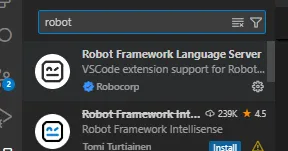
Robot Framework extension
That is basically it. You can create a new folder, create a file with the .robot extension, and start writing your test case.