Requirements are a fairly small topic, but the skill of reading and analysing them is large. A lot of a tester's work is tied to requirements, so one way or another I had to write a separate article about them.
The concept
There are many ways to define requirements: customer requirements, user requirements, system requirements and so on. But you cannot really use “requirement” to explain what a requirement is, can you?
A requirement is a statement or constraint on the design of a software product intended to serve a customer's needs.
That is the rough idea. If we say Users can log in with a Google account, that is a requirement because it implies that the customer wants Google-account login and we have to build it.
Another requirement might be Users may log in only after completing a CAPTCHA. It is a constraint on the login feature: the login function must have a CAPTCHA. Or consider The website must run on a Node.js backend. That is also a constraint. The customer-maintenance team knows Node.js, so the backend cannot use another framework.
Typical question: What is a requirement?
Statement and constraint
A requirement in statement form usually says something the product needs to have—a feature or a particular behaviour. Its wording often follows a recognisable structure:
As a user, I want...
When I do..., I want...
A requirement in constraint form states a condition the product design must meet. It is usually a condition for a feature or behaviour to work properly, or a limitation:
User must...
System must...
System needs...
Typical question: What is the difference between a statement and a constraint?
Typical question: What does a requirement look like?
Types of constraint
The basic constraint types are roughly:
- Quality constraint: constraints on product quality, defect rate, downtime or maintainability.
- Environment constraint: the environment in which the product must work.
- Design constraint: a design limitation, such as requiring a particular backend framework.
- Performance constraint: performance requirements, such as handling 100 concurrent users or processing a request within a specified number of seconds.
Typical question: What are the types of constraint?
Levels of requirement
Requirements also have levels, as shown in the diagram:
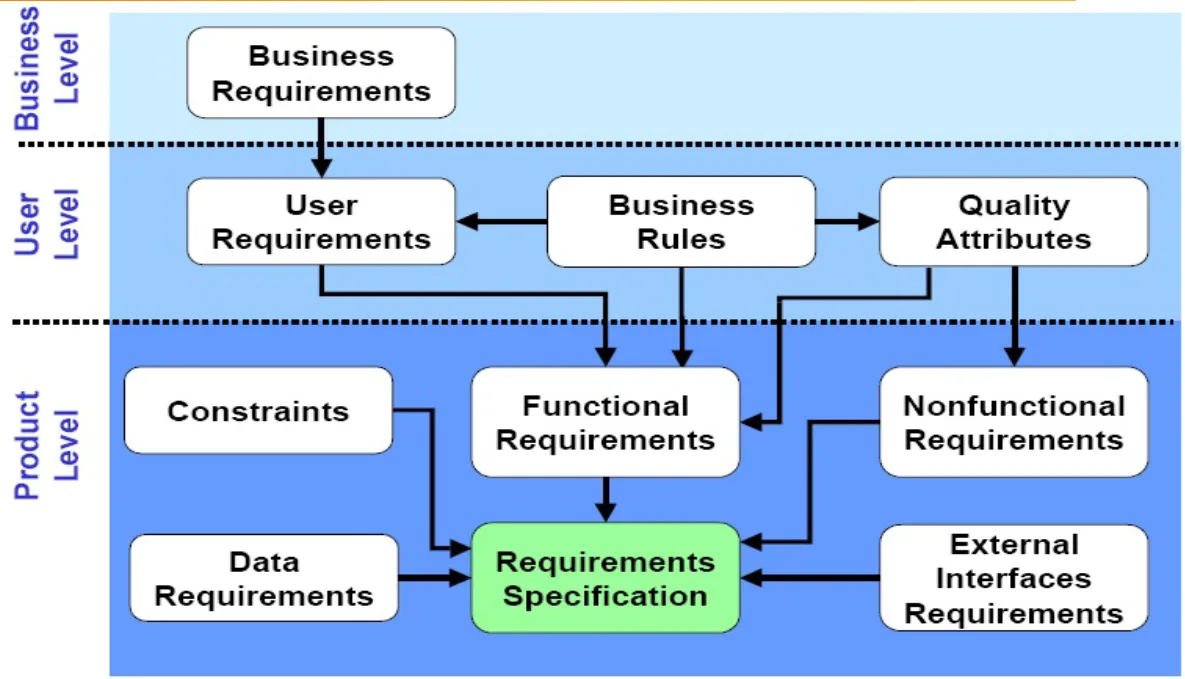
The simple version is:
- Business-level requirement: the customer's grand, impressive and sometimes terrifying vision for the product. For example, The app will expand the business to ordinary customers and enter their everyday lives, or The website will promote the brand and increase its influence and reach. Testers usually do not need much of this—it belongs to economics, marketing and so on. If it is relevant, understand enough to know what the product is about.
- User-level requirement: what users want to use, see and interact with in the product. These are basically end-user functions or quality requirements.
- System-level requirement: what the system needs behind the frontend—things users cannot see but that support the user requirements.
For example, a user-level requirement in a banking app might be Users can track their spending for the month. A system-level requirement could be The system must retain each user's spending data for the most recent 365 days and allow monthly statistics to be queried.
Typical question: What are the levels of requirements?
Functional and non-functional requirements
The diagram also shows “functional” and “non-functional”. These are two basic requirement types:
- Functional requirement: a requirement about the product's functions and behaviour. In short, it answers: What can the product do?
- Non-functional requirement: a requirement about quality, performance, security and so on. It answers: How does the product do it? or How well does it do it?
A functional example is Users can log in with a Google account. A non-functional example is The system must handle 100 users accessing and using it concurrently.
Typical question: What are functional and non-functional requirements?
Studying and clarifying a requirement
To “study” a requirement—to read it, analyse it and verify our own understanding—a tester goes through a chain of activities:
- Read the customer's requirement, requirement documents and related documents, and extract the requirement statements.
- Break down the meaning of those statements and identify the requirement's characteristics using a consistent logic.
- Analyse the characteristics and find what we do not understand or cannot understand—apparent logic or wording errors.
- Create questions that verify or clarify the requirement and send them to the relevant people.
The first two are straightforward: read and break things down. Reading is easy unless you cannot read, but it depends on how the requirement is written. Sometimes the wording is extremely obscure or ambiguous. Note that immediately and take it to the BA to clarify.
Assume the requirement is reasonably clear. We can imagine what the customer wants and move to analysis. We do not analyse a requirement in quite the same way a developer does. A developer analyses it to understand the feature and build it. We understand it to see how users will use the feature, then plan how to test it when development hands it over.
Typical question: What are the steps to study a requirement?
Study a functional requirement
To study a functional requirement, extract information from the prose and fill in these areas:
- Purpose: why the function exists, what it helps users do and what they use it for.
- Actor: the people who use or interact with the function.
- Precondition: conditions that must be met before the function can be used.
- Trigger: the event or action that activates the function.
- Workflow: the function's actions and what happens while it runs.
- Alternate flow: other paths when secondary conditions occur, the user activates the function differently or the function fails.
- Postcondition / result: what the user receives after using the function.
- Business rules: rules, constraints and conditions the function must follow.
Typical question: What are the steps to study a functional requirement?
Study a UI/UX requirement
This part can be quick. Studying an interface requirement means going through three things:
- Mock-up / design / prototype: understand roughly what the interface should look like.
- Element description: understand each UI element, what it does and how it interacts with the user.
- Style: understand the design, colours, fonts and so on.
When testing the interface, the product UI needs to match the design on all three fronts.
Typical question: What are the steps to study a UI/UX requirement?
Clarify a requirement
To verify a requirement, we create questions that help us understand or validate it.
Before sending a question, make sure:
- It is genuinely a question—something unclear, impossible to understand or apparently problematic. Think first; do not raise every thing that feels a little odd.
- The answer is not already in the formal documents, hidden in a page we skimmed too quickly.
- The question is focused, not wandering or based only on feeling.
- For technical questions, search first, so we know it is not common knowledge that we simply do not know.
- For a question involving a choice, suggest options to the customer or BA instead of making them do the research. Say where we are strong.
Normally, raise questions with the Lead first, because:
- The team should verify that nobody can answer it, either because nobody knows or because there are too many possible answers. Most importantly, we must not guess anything.
- The Lead helps communicate with the customer and BA and sets a deadline for answers. We cannot wait forever; everything has a schedule, and customers or BAs will drift along if nobody gives them a push.
Typical question: What should we do when raising a question?