After analysing the requirement and splitting it into test conditions, we finally reach the part people usually call “writing test cases”.
In the previous article I used High Level Test Case for the short description. This one goes into more detail; many teams call it a Low Level Test Case. That is project vocabulary, not two mandatory ISTQB layers. If your company has a different template, use the company template. Don’t take this article into a meeting and demand that the whole team change its columns.
What does a test case need to answer?
Someone picking up the test case should understand:
- What are we checking?
- What state and data must exist before execution?
- What steps must be performed?
- After each important action, what result should the system produce?
- Which build and environment is this test running on?
A common template has fields like these:
| Field | What it is for |
|---|---|
| Test Case ID | An identifier for tracing, reporting and discussion |
| Title | One sentence describing the scenario and main result |
| Preconditions | The state that must be true before starting |
| Test Data | Account, input, file or data needed |
| Steps | Actions in order |
| Expected Result | Observable behaviour that is expected |
| Priority | Helps choose execution order when time is limited |
| Status | Test-case lifecycle status such as Draft, Approved or Obsolete |
Execution status — Pass, Fail, Blocked — usually belongs to a test run, not the lifecycle of the test case itself. If a tool puts both in one place, follow the tool, but keep the distinction in your head.
Example: successful login
Suppose the requirement has been clarified:
- Account
admin@example.comis active. - The correct password is
Correct#123. - A successful login sends the user to
/dashboard. - A session is created and the username appears in the header.
The test case could look like this:
| Field | Content |
|---|---|
| ID | LOGIN-001 |
| Title | Active user logs in successfully with valid credentials |
| Preconditions | User is on the Login page; account is active; no session exists |
| Test Data | admin@example.com / Correct#123 |
| Priority | P0 |
Steps:
| # | Action | Expected Result |
|---|---|---|
| 1 | Enter email admin@example.com | Email appears correctly in the field |
| 2 | Enter password Correct#123 | Password is masked as designed |
| 3 | Click Login | Request is processed once; user goes to /dashboard; header shows the correct account name |
There is no need to split “click the field”, “move a hand to the keyboard” and “type the letter a” into three steps. A test case is not a script for a human-shaped robot. Write enough for another person to execute it consistently, but don’t describe things anyone can see after opening the app.
Expected Result must be checkable
An expected result such as:
The system works correctly.
...leaves you not knowing where to look.
Be more specific:
The user is redirected to
/dashboard, a valid session is created and the header displays the nameAdmin.
If one step has several important results, you can group them as long as they remain readable. If the expected result fills half the screen, the test case is probably carrying too many goals. Revisit how the scenario was split.
A precondition is not a hidden step
A precondition describes the state that needs to exist, for example:
- The account exists and is active.
- The cart contains an in-stock product.
- Feature flag
new-checkoutis enabled.
If creating that state through the UI is itself a flow that needs testing, write a separate test case or setup. If it is only a condition for testing login, don’t make the person running the test register an account from scratch every time just because “the user must reach this screen”.
Linking another test case as a precondition can be convenient, but it easily creates a dependency chain: TC-03 needs TC-02, TC-02 needs TC-01, and TC-01 fails so the whole set sits still. Prefer independent setup and resettable data where possible.
Keep test data separate or put it in the title?
The title should describe the scenario:
Active user logs in successfully with valid credentials.
Keep the concrete values in test data:
email = admin@example.com
password = Correct#123
If the value is the boundary or the thing that makes this case different from another, putting it in the title is reasonable:
Password with exactly 12 characters is accepted.
There is no rule that every title must contain a real account. Stuffing long data into a name makes the report look like a broken log line.
Where does Priority come from?
P0, P1 or High, Medium, Low are project conventions. Don’t assign P0 to every login test and announce that “login is the most important thing”.
Priority should consider:
- Business criticality of the flow.
- Risk and defect history.
- How often users go through it.
- Whether this test blocks many others.
- Execution cost and time.
The point is that when only 30 minutes remain, the team knows what to run first. If every case is P0, the Priority column is decorating the spreadsheet.
Reviewing a test case
Before execution, read it again and ask:
- What requirement or risk does this case trace to?
- Can the preconditions and data actually be created?
- Is the expected result observable?
- Is this case duplicating another one?
- Can someone who did not write it run it again?
- If it fails, is there enough information to investigate?
Peer review helps catch assumptions and missing coverage. It does not need to become a meeting for policing semicolons; first check whether the test is correct and useful.
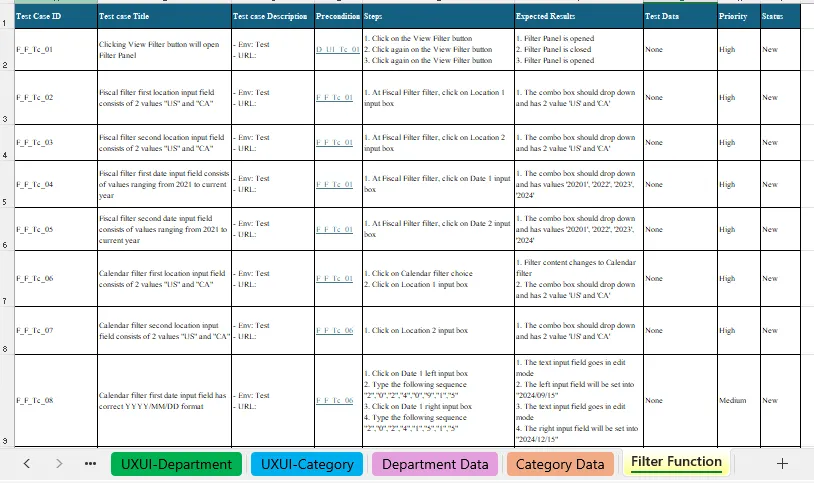
A spreadsheet is fine for a small set. As the number of cases, runners and test runs grows, a test management tool makes life easier.
Wrap-up
A good test case is not a long test case. It is clear enough for someone else to run, specific enough to tell pass from fail, and traceable enough to explain why it exists.
The next article goes into Bug Logging. A failed test case is only a signal; turning that signal into a bug report a developer can reproduce is a different story.