In the first mobile script article, the locator, action, and assertion are still in a single test file. For one case, it looks very simple. When there are about thirty cases, the same locator appears in seven files and the developer changes the ID once, you will start a trip around the project to fix each place.
Page Object Model properly addresses that issue: a screen must have a place responsible for its locator and behavior. With Robot Framework, that place is usually a resource file. There is no rule forcing you to write a Python class just to be called a POM.
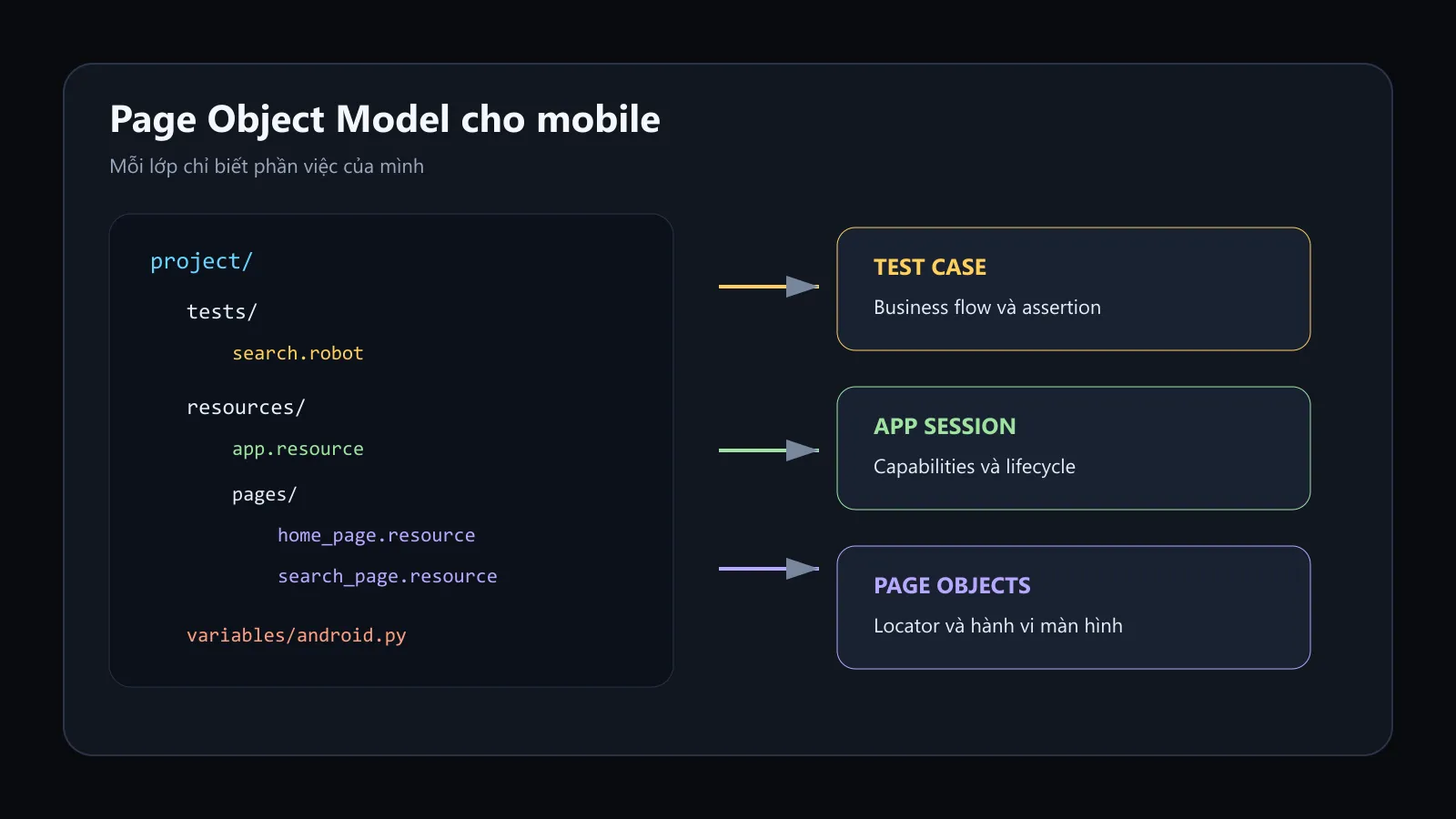
The diagram I built follows the exact project structure in the lesson: test maintains the flow, page keeps the locator and behavior, while app resource manages the session lifecycle.
The problem of the script is mixing everything
*** Test Cases ***
Search With The Entered Query
    Open Application    http://127.0.0.1:4723
    ...    platformName=Android
    ...    automationName=UiAutomator2
    ...    app=${CURDIR}/../demoapp/ApiDemos-debug.apk
    ...    appActivity=.app.SearchInvoke
    Input Text
    ...    id=io.appium.android.apis:id/txt_query_prefill
    ...    Robot Framework
    Click Element    id=io.appium.android.apis:id/btn_start_search
    Wait Until Page Contains Element    id=android:id/search_src_text
    Element Text Should Be
    ...    id=android:id/search_src_text
    ...    Robot Framework
    Close Application
This test runs, but it is doing four things:
- manage Appium session;
- know the package, activity, and capability;
- know the specific locator of the Search screen;
- describe the goal of the test.
If the input cell ID changes, the test case must be fixed. If switching from AVD to USB, the test case must be fixed. If adding a new case, you copy the pile of open app again. This is not a syntax issue; this is a matter of mixed responsibilities.
Structure after separating POM
robot-android/
├── demoapp/
│   └── ApiDemos-debug.apk
├── resources/
│   ├── app.resource
│   └── pages/
│       ├── home_page.resource
│       └── search_page.resource
├── tests/
│   └── search.robot
├── variables/
│   └── android.py
└── requirements.txtThe arrow indicates that the upper layer uses the lower layer. app.resource should not import the page backward; otherwise, the dependency will loop and the project will start to smell.
Variable file: only care about target configuration
variables/android.py keeps the idea from the previous article, but calculates the APK path from the location of the Python file itself. This way, the path does not depend on the random current working directory:
import os
from pathlib import Path


def get_variables():
    project_root = Path(__file__).resolve().parents[1]
    target = os.getenv("ANDROID_TARGET", "avd")

    capabilities = {
        "platformName": "Android",
        "automationName": "UiAutomator2",
        "app": str(project_root / "demoapp" / "ApiDemos-debug.apk"),
        "appPackage": "io.appium.android.apis",
        "appActivity": ".ApiDemos",
        "autoGrantPermissions": True,
    }

    if target == "usb":
        udid = os.getenv("ANDROID_UDID")
        if not udid:
            raise ValueError("ANDROID_UDID is required for USB execution")
        capabilities["udid"] = udid
    elif target == "avd":
        capabilities["avd"] = os.getenv("ANDROID_AVD", "Pixel_7_API_35")
    else:
        raise ValueError(f"Unsupported ANDROID_TARGET: {target}")

    return {
        "APPIUM_URL": os.getenv("APPIUM_URL", "http://127.0.0.1:4723"),
        "CAPABILITIES": capabilities,
    }
Path(__file__).resolve().parents[1] takes the project root from the exact location of the android.py file. This way, running the command anywhere no longer makes the APK path follow that location.
Variable file does not contain screen locators and does not open a session. It only returns configuration. A file that knows little but knows the right thing is easier to live with than a common_everything_final.py file that knows the entire universe.
App resource: owning the session lifecycle
Create resources/app.resource:
*** Settings ***
Library      AppiumLibrary
Variables    variables/android.py

*** Keywords ***
Open The ApiDemos Application
    Open Application
    ...    ${APPIUM_URL}
    ...    appium:options=${CAPABILITIES}

Close All Appium Sessions
    Close All Applications

Capture Evidence When Test Fails
    Run Keyword If Test Failed
    ...    Capture Page Screenshot
    ...    failed-${TEST NAME}.png
Open The ApiDemos Application hides all capabilities from the page and tests. The keyword teardown captures evidence before the session is closed, because if you take it after closing, Appium can only capture disappointment.
Capture Evidence When Test Fails must be called by Test Teardown, because only in that scope does Robot Framework have the pass/fail status of the current test. Closing the session uses a separate Suite Teardown.
Home Page: only knows the Home screen
Create resources/pages/home_page.resource:
*** Settings ***
Library    AppiumLibrary

*** Variables ***
${HOME_TITLE}       accessibility_id=API Demos
${APP_MENU_ITEM}    accessibility_id=App
${SEARCH_MENU_ITEM}    accessibility_id=Search

*** Keywords ***
Home Page Should Be Visible
    Wait Until Page Contains Element    ${APP_MENU_ITEM}    timeout=10s

Open The Search Screen
    Home Page Should Be Visible
    Click Element    ${APP_MENU_ITEM}
    Wait Until Page Contains Element    ${SEARCH_MENU_ITEM}    timeout=10s
    Click Element    ${SEARCH_MENU_ITEM}
Keep the locator on the Variables section and only provide keywords that make sense to the reader. The test case does not need to know whether App is being searched by accessibility id or resource-id.
The variable ${HOME_TITLE} is declared but not used, so it should be deleted, or an assertion that actually needs it should be added. I intentionally left it in the example to point out a common issue in POM: collecting locators like hoarding items in a warehouse. A locator that doesn’t serve any keyword only makes the next person think it is important.
A more concise version:
*** Variables ***
${APP_MENU_ITEM}       accessibility_id=App
${SEARCH_MENU_ITEM}    accessibility_id=Search
Search Page: has input, button, and results
Create resources/pages/search_page.resource:
*** Settings ***
Library    AppiumLibrary

*** Variables ***
${SEARCH_QUERY_INPUT}    id=io.appium.android.apis:id/txt_query_prefill
${SEARCH_SUBMIT_BUTTON}  id=io.appium.android.apis:id/btn_start_search
${SEARCH_RESULT_TEXT}    id=android:id/search_src_text

*** Keywords ***
Search Page Should Be Visible
    Wait Until Page Contains Element
    ...    ${SEARCH_QUERY_INPUT}
    ...    timeout=10s

Enter Search Query
    [Arguments]    ${query}
    Search Page Should Be Visible
    Clear Text    ${SEARCH_QUERY_INPUT}
    Input Text    ${SEARCH_QUERY_INPUT}    ${query}

Submit Search
    Click Element    ${SEARCH_SUBMIT_BUTTON}

Search Result Should Be
    [Arguments]    ${expected}
    Wait Until Page Contains Element
    ...    ${SEARCH_RESULT_TEXT}
    ...    timeout=10s
    Element Text Should Be    ${SEARCH_RESULT_TEXT}    ${expected}
Enter Search Query does not just call Input Text; it ensures the page is ready and clears the old data. Test does not have to remember those three technical steps.
However, the page keyword should not become a hidden test case. The assertion Search Result Should Be here belongs to the page because it checks the direct state of the page; the test is still the place that determines the expected value.
Test case after refactor
Create tests/search.robot:
*** Settings ***
Resource          resources/app.resource
Resource          resources/pages/home_page.resource
Resource          resources/pages/search_page.resource
Suite Setup       Open The ApiDemos Application
Test Teardown     Capture Evidence When Test Fails
Suite Teardown    Close All Appium Sessions

*** Test Cases ***
Người Dùng Có Thể Tìm Kiếm Nội Dung
    [Tags]    smoke    android
    Open The Search Screen
    Enter Search Query    Robot Framework
    Submit Search
    Search Result Should Be    Robot Framework
Now the test case reads the correct flow. It doesn't know the Appium URL, serial, activity, or button ID. That is the goal of POM: change the interface details in one place while the test meaning remains the same.
Why do imports not use ../?
Run from the project root:
robot --pythonpath . --outputdir results tests--pythonpath . adds the project root to the search path of Robot Framework. This allows tests to import resources/... consistently even if the suite file is located deeper.
In VS Code with RobotCode, add to .vscode/settings.json:
{
  "robotcode.robot.pythonPath": [
    "./"
  ]
}
Without configuring the IDE, the terminal runs, but the editor underlines the resource in red. The code is not broken; the two environments are using two different search paths.
Avoid duplicate keyword names between pages
If both the Home Page and the Search Page have the keyword Page Should Be Visible, Robot Framework may report an ambiguous keyword. There are two ways:
Home Page Should Be Visible
Search Page Should Be Visible
Or call the resource name as namespace:
home_page.Page Should Be Visible
search_page.Page Should Be Visible
I prioritize keyword names that already carry context for public behavior. Namespaces are useful when two resources really need the same name, but if every line has to be prefixed, tests start to look more like calling modules than reading business logic.
Try changing the locator without modifying the test
Assume the Android team changes the input to accessibility id search-query. Only modify:
${SEARCH_QUERY_INPUT} accessibility_id=search-queryKeep the file tests/search.robot as is. If you still have to find and fix five test cases, the locator has leaked out of the page object somewhere.
POM does not make locators naturally durable. It just organizes ownership in the right place. A fragile XPath placed in POM is still a fragile XPath; it just wears an architectural coat that looks more serious.