Page Object Model in the previous lesson gathers everything belonging to a screen into the correct page. But a real application often has a toolbar appearing on ten screens, a confirmation dialog used in five flows, and a list of two dozen rows with the same structure. If we copy them into each Page Object, we just move duplicate code from the test to the resource, without completely solving the problem.
Component Object Model goes one step further: any UI part that has its own structure and behavior, which is reused or repeated, should be given its own resource.
This is a code organization convention, not a feature with a toggle in Appium, and it's not an official Robot Framework model that forces you to comply. If a project has three tiny screens but builds seventeen components, that's drawing a snake and adding legs, not clean architecture.
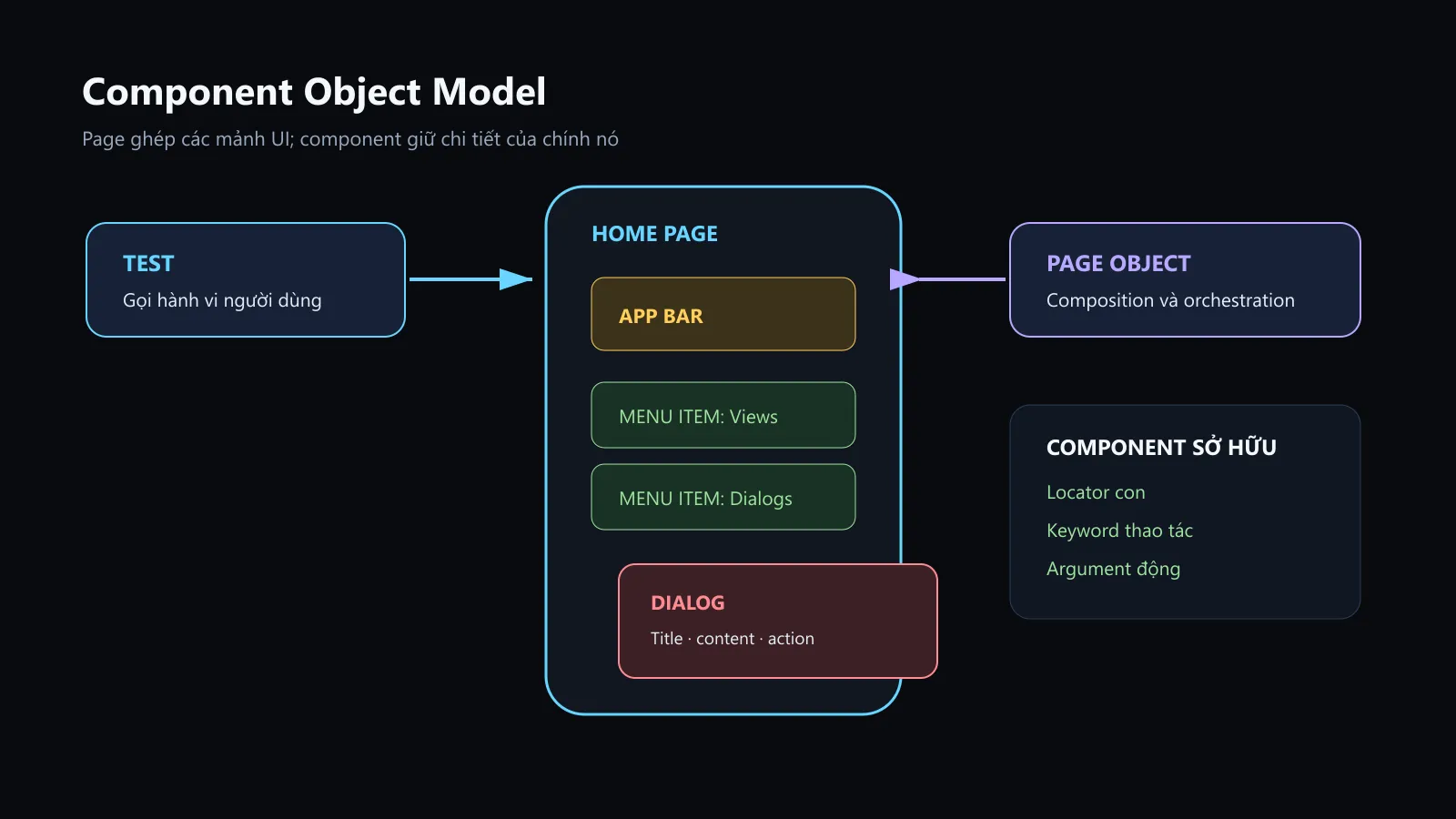
The diagram I created to indicate boundaries of responsibility: pages create compositions, components own locators and behaviors of reusable UI parts.
How is Page different from Component?
| Object | Represents | Owns | Example |
|---|---|---|---|
| Page Object | A screen or main navigation state | Screen-level locator, behavior and orchestration | Home Page, Search Page |
| Component Object | A UI area with its own structure/behavior | Root, child locators, and component actions | Toolbar, menu row, dialog |
| Common keyword | A technical action not belonging to a specific UI | Small utility, does not hold screen locators | Take screenshot name, normalize text |
Components do not replace pages. Pages use components to complete the screen's behavior.
Extended project structure
resources/
├── app.resource
├── components/
│   ├── app_bar.resource
│   ├── menu_item.resource
│   └── dialog.resource
└── pages/
    ├── home_page.resource
    └── search_page.resource
components is not a place to throw in every unknown keyword. A component must be able to answer three questions:
- What UI area does it represent?
- Where is its root or boundary?
- Which page is using its behavior?
If you cannot answer, it is very likely that you are creating the renamed version of common.resource.
Menu item: a component driven by its label
In ApiDemos, menu items can be found by accessibility id. Create resources/components/menu_item.resource:
*** Settings ***
Library    AppiumLibrary

*** Keywords ***
Menu Item "${label}" Should Be Visible
    ${locator}=    Build Menu Item Locator    ${label}
    Wait Until Page Contains Element    ${locator}    timeout=10s

Select Menu Item "${label}"
    ${locator}=    Build Menu Item Locator    ${label}
    Wait Until Page Contains Element    ${locator}    timeout=10s
    Click Element    ${locator}

Build Menu Item Locator
    [Arguments]    ${label}
    ${locator}=    Set Variable    accessibility_id=${label}
    RETURN    ${locator}
Select Menu Item "App" is an embedded argument: Robot Framework takes the part between the two quotes as ${label}. Test or page calls very naturally:
Select Menu Item "App"
Select Menu Item "Search"
The keyword for creating a locator is grouped separately so that displaying and clicking do not automatically assemble the string in two different ways. If later the menu switches to resource-id, only one place needs to be fixed.
Because ${label} goes straight to the accessibility id, there is no XPath escape problem. If you build a dynamic XPath from any input, you have to handle the quote marks and not allow test data to arbitrarily turn into a selector expression.
App bar: a component with a fixed locator
Create resources/components/app_bar.resource:
*** Settings ***
Library    AppiumLibrary

*** Variables ***
${APP_BAR_ROOT}       id=android:id/action_bar_container
${APP_BAR_TITLE}      id=android:id/action_bar_title
${APP_BAR_NAVIGATE_UP}    accessibility_id=Navigate up

*** Keywords ***
App Bar Title Should Be
    [Arguments]    ${expected_title}
    Wait Until Page Contains Element    ${APP_BAR_ROOT}    timeout=10s
    Element Text Should Be    ${APP_BAR_TITLE}    ${expected_title}

Navigate Back With App Bar
    Wait Until Element Is Visible    ${APP_BAR_NAVIGATE_UP}    timeout=10s
    Click Element    ${APP_BAR_NAVIGATE_UP}
Root ${APP_BAR_ROOT} helps confirm that the component has appeared before reading the title. If the application uses a custom toolbar without android:id/action_bar_*, the component still retains the API keyword, only the internal locator is changed.
Dialog: component with title, message, and action
Create resources/components/dialog.resource:
*** Settings ***
Library    AppiumLibrary

*** Variables ***
${DIALOG_ROOT}      id=android:id/parentPanel
${DIALOG_TITLE}     id=android:id/alertTitle
${DIALOG_MESSAGE}   id=android:id/message
${DIALOG_POSITIVE}  id=android:id/button1
${DIALOG_NEGATIVE}  id=android:id/button2

*** Keywords ***
Dialog Should Be Visible
    Wait Until Element Is Visible    ${DIALOG_ROOT}    timeout=10s

Dialog Content Should Be
    [Arguments]    ${expected_title}    ${expected_message}
    Dialog Should Be Visible
    Element Text Should Be    ${DIALOG_TITLE}    ${expected_title}
    Element Text Should Be    ${DIALOG_MESSAGE}    ${expected_message}

Confirm Dialog
    Dialog Should Be Visible
    Click Element    ${DIALOG_POSITIVE}

Cancel Dialog
    Dialog Should Be Visible
    Click Element    ${DIALOG_NEGATIVE}
The dialog component does not know why the dialog appears. The page knows which action opens the dialog; the test knows whether to confirm or cancel according to the scenario. The three layers hold three different types of knowledge.
The page uses components instead of copying locators
Refactor resources/pages/home_page.resource:
*** Settings ***
Library     AppiumLibrary
Resource    resources/components/app_bar.resource
Resource    resources/components/menu_item.resource

*** Keywords ***
Home Page Should Be Visible
    App Bar Title Should Be    API Demos
    Menu Item "App" Should Be Visible

Open The Search Screen
    Home Page Should Be Visible
    Select Menu Item "App"
    Select Menu Item "Search"
    Search Page Should Be Visible
Open The Search Screen is using the keyword Search Page Should Be Visible, so the page needs to import Search Page or move that assertion to the test. If Home Page imports Search Page, later on Search Page should absolutely not import Home Page back.
A cleaner approach is for the page to only complete the navigation:
Open The Search Screen
    Home Page Should Be Visible
    Select Menu Item "App"
    Select Menu Item "Search"
And test to confirm the landing page:
Open The Search Screen
Search Page Should Be Visible
This method avoids circular dependency, while the test clearly shows that the navigation milestone has been successful.
Before and after having a component
Before:
Mở Menu App
    Wait Until Page Contains Element    accessibility_id=App
    Click Element    accessibility_id=App

Mở Menu Search
    Wait Until Page Contains Element    accessibility_id=Search
    Click Element    accessibility_id=Search
Sau:
Open The Search Screen
    Select Menu Item "App"
    Select Menu Item "Search"
The part that was removed was not just the two duplicate locators. We also consolidated the rule "menu item must appear before clicking" into a single component. When we need to change the timeout or locator strategy, all pages using the menu will receive the same change.
Component with root locator
Not every component can be found using a fullscreen accessibility id. Suppose a list row has a root by resource-id and contains title, subtitle, action:
*** Keywords ***
Tạo Locator Cho Result Row
    [Arguments]    ${title}
    ${root}=    Set Variable
    ...    xpath=//*[@resource-id="com.example:id/result_row"][.//*[@resource-id="com.example:id/title" and @text="${title}"]]
    RETURN    ${root}

Mở Result Row
    [Arguments]    ${title}
    ${root}=    Tạo Locator Cho Result Row    ${title}
    Wait Until Page Contains Element    ${root}    timeout=10s
    Click Element    ${root}
This example must use XPath to represent the row-title relationship. The important point is that XPath stops at the component root and relies on the resource-id, not crawling from the full screen root through a series of indexes.
For a real application, it's better for the dev to provide an ID or content description directly for the row. Automation can patch missing accessibility with XPath, but if you keep patching it and call that design, it's a bit of a Canadian illusion.
Test case after page composition is done
*** Settings ***
Resource          resources/app.resource
Resource          resources/pages/home_page.resource
Resource          resources/pages/search_page.resource
Test Teardown     Capture Evidence When Test Fails
Suite Setup       Open The ApiDemos Application
Suite Teardown    Close All Appium Sessions

*** Test Cases ***
Người Dùng Có Thể Tìm Kiếm Nội Dung
    Open The Search Screen
    Search Page Should Be Visible
    Enter Search Query    Robot Framework
    Submit Search
    Search Result Should Be    Robot Framework
Tests do not import components because components are an implementation detail of a page. Robot Framework allows tests to call keywords transitively from imported resources, but relying on that behavior to test by calling components directly will blur the architectural boundaries. The project's review convention must prohibit tests from using locators or component keywords directly, unless the component itself is the object being tested independently.
When should you create a component?
Create a component when the UI has at least one of the following signs:
- appears on many pages;
- repeats as multiple instances with the same structure;
- has many child locators and individual behaviors;
- changes independently from the page that contains it.
Keep it in the Page Object when the element belongs to only one screen and the logic is very small. Use a common keyword when it is a utility that does not own a UI, for example creating a timestamp for a screenshot name.
Don't use line count as a rule like 'over 50 lines, you must split the component.' A 30-line resource mixing three responsibilities is still bad; an 80-line resource that represents a single complex table can still be reasonable. Look at ownership, not file weight.