Setup and Teardown
Setup prepares the environment before a test case. Teardown cleans the environment after it.
Keywords used in (Suite/Test) Setup establish a precondition for the test. Teardown is not really a postcondition; it cleans things up so the next test can start.
Setup
Setup runs before a test case or test suite, depending on its scope.
There are three main kinds:
Suite Setup: runs before a test suite starts.Test Setup: runs before a test case starts.[Setup] Run Keyword: runs before a keyword starts.
*** Settings ***
Test Setup    Search RB

*** Test Cases ***
Test Case 1
    Log    Test Case 1

*** Keywords ***
Open Google
    Open Browser    http://google.com    chrome

Search RB
    [Setup]   Open Google
    Input Text    name=q    Robot Framework
    Click Button    name=btnK
Here Test Setup runs Search RB before Test Case 1 starts. Search RB itself runs Open Google first because its [Setup] calls Open Google.
*** Settings ***
Suite Setup    Open Google
Test Setup    Search RB

*** Test Cases ***
Test Case 1
    Log    Test Case 1

*** Keywords ***
Open Google
    Open Browser    http://google.com    chrome

Search RB
    Input Text    name=q    Robot Framework
    Click Button    name=btnK
Here Open Google runs before the suite begins, and Search RB runs before Test Case 1 begins.
The two forms can look interchangeable, but once a suite has several test cases, choosing the right Setup scope matters.
The rule I keep in mind is this:
Think of Setup scope as the position where the keyword is injected into the test case.
Suppose we have two test cases:
*** Test Cases ***
[TestCase 1]
    [Keyword 1]
    ...
    [Keyword n]

[TestCase 2]
    [Keyword 1]
    ...
    [Keyword n]
With Suite Setup and Test Setup, the injection looks like this:
*** Test Cases ***
    [Suite Setup]

[TestCase 1]
    [Test Setup]
    [Keyword 1]
    # ...
    [Keyword n]

[TestCase 2]
    [Test Setup]
    [Keyword 1]
    # ...
    [Keyword n]
I use this model because a keyword in Test Setup becomes part of the test case and runs before its other keywords. Suite Setup runs before the first test case and sits outside the test case itself.
What RB does when Setup fails
- If Test Setup fails, the whole test case fails and the keywords below it do not run.
- If Suite Setup fails, the whole suite fails. Its test cases are marked as failed even though their own keywords never run.
- If Suite Setup contains several keywords, they run in order; after one fails, the later ones do not run.
- If a test case has its own Test Setup, that setup replaces the one declared in
*** Settings ***.
Typical question: What is (Suite/Test) Setup?
Typical question: What is the difference between Suite Setup and Test Setup?
Teardown
Teardown runs after a test case or suite finishes, depending on its scope.
Its job is to clean up, either to prepare for the next test case or to release resources for the whole suite.
There are three main kinds:
Suite Teardown: runs after a suite finishes.Test Teardown: runs after a test case finishes.[Teardown] Run Keyword: runs after a keyword finishes.
*** Settings ***
Suite Setup    Open Google
Suite Teardown    Close Browser

Test Setup    Search RB
Test Teardown    Go To Google

*** Test Cases ***
Test Case 1
    Log    Test Case 1

*** Keywords ***
Open Google
    Open Browser    http://google.com    chrome

Search RB
    Input Text    name=q    Robot Framework
    Click Button    name=btnK

Go To Google
    Go To    http://google.com
Suite Teardown runs Close Browser after the suite. Test Teardown runs Go To Google, returning the browser to its starting page after Test Case 1.
Teardown also has a scope and rules for failure, similar to Setup. For the same two test cases, its injection looks like this:
*** Test Cases ***
[TestCase 1]
    [Keyword 1]
    ...
    [Keyword n]

[TestCase 2]
    [Keyword 1]
    ...
    [Keyword n]
*** Test Cases ***
[TestCase 1]
[Test Setup]
[Keyword 1]
# ...
[Keyword n]
[Test Teardown]
[TestCase 2]
[Test Setup]
[Keyword 1]
# ...
[Keyword n]
[Test Teardown]
[Suite Teardown]As with Setup, Suite Teardown is outside the test case and Test Teardown is inside it.
What RB does when Teardown fails
- Teardown always runs, regardless of what happens in the test case or suite.
- If Test Teardown fails, the test case is marked as failed.
- If Suite Teardown fails, the suite and every test case in it are marked as failed.
- All Teardown keywords run. If one fails, later keywords still run.
- If a test case has its own Test Teardown, it replaces the one declared in
*** Settings ***.
Typical question: What is (Suite/Test) Teardown?
Typical question: What is the difference between Suite Teardown and Test Teardown?
Typical question: How does Robot Framework handle Setup and Teardown failures?
Putting it together
Look at this suite:
*** Settings ***
Library   SeleniumLibrary
Suite Setup    Open Browser   http://google.com    chrome
Suite Teardown    Close Browser

Test Setup    Open Browser    http://youtube.com    chrome
Test Teardown       Open Browser   http://google.com    chrome

*** Test Cases ***
Test Case 1
    Log    Test Case 1

Test Case 2
    [Setup]   Open Browser    http://facebook.com    chrome
    Log    Test Case 2

Test Case 3
    Log    Test Case 3
    [Teardown]   Close Browser

Test Case 4
    Log    Test Case 4
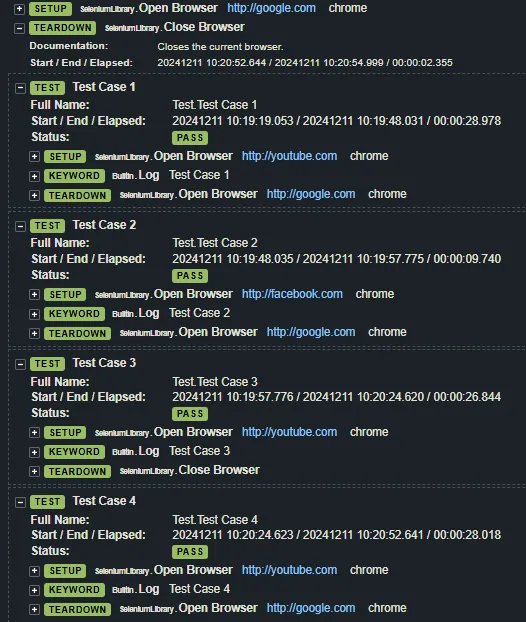
What is the execution order?
The complete suite runs in this order:
Open Chrome on https://google.com
    Open Chrome on https://youtube.com
    Open Chrome on https://google.com

    Open Chrome on https://facebook.com
    Open Chrome on https://google.com

    Open Chrome on https://google.com
    Close Chrome

    Open Chrome on https://youtube.com
    Open Chrome on https://google.com
Close Chrome
Here is the test-suite log:
Log
Less mysterious now?