When running tests with Robot Framework, broken test cases are a normal part of developing an automation suite. Robot provides a few features and tricks to make the cause easier to find.
Errors
An Error is essentially a test case failing because the test case was written incorrectly.
When a test case fails, the keywords after the failing keyword normally do not run. Execution jumps to Test Teardown, finishes it, and moves to the next test case. The test and suite results are then reported in log.html and output.xml.
Whether you run from VS Code or the command line, the first result appears in the terminal. For example:
------------------------------------------------------------------------------
Duy247.github.io.Logout                                               | FAIL |
2 tests, 1 passed, 1 failed
==============================================================================
Duy247.github.io                                                      | FAIL |
2 tests, 1 passed, 1 failed
==============================================================================
That report is not very useful for finding the bug because it lacks details. A GUI run gives a slightly better terminal report:
Logout
==============================================================================
Test Normal                                                           | PASS |
------------------------------------------------------------------------------
Test Flaky                                                            | FAIL |
No keyword with name 'Log 2' found. Did you mean:
    BuiltIn.Log
------------------------------------------------------------------------------
Logout                                                                | FAIL |
2 tests, 1 passed, 1 failed
==============================================================================
This is easier to follow: each test is reported as pass or fail with the reason, followed by the suite summary. The log.html file contains the same useful information. The suite is:
*** Settings ***
Name    Logout
Library   SeleniumLibrary

*** Test Cases ***
Test Normal
    Log    1
Test Flaky
    [Tags]    flaky
    Log 2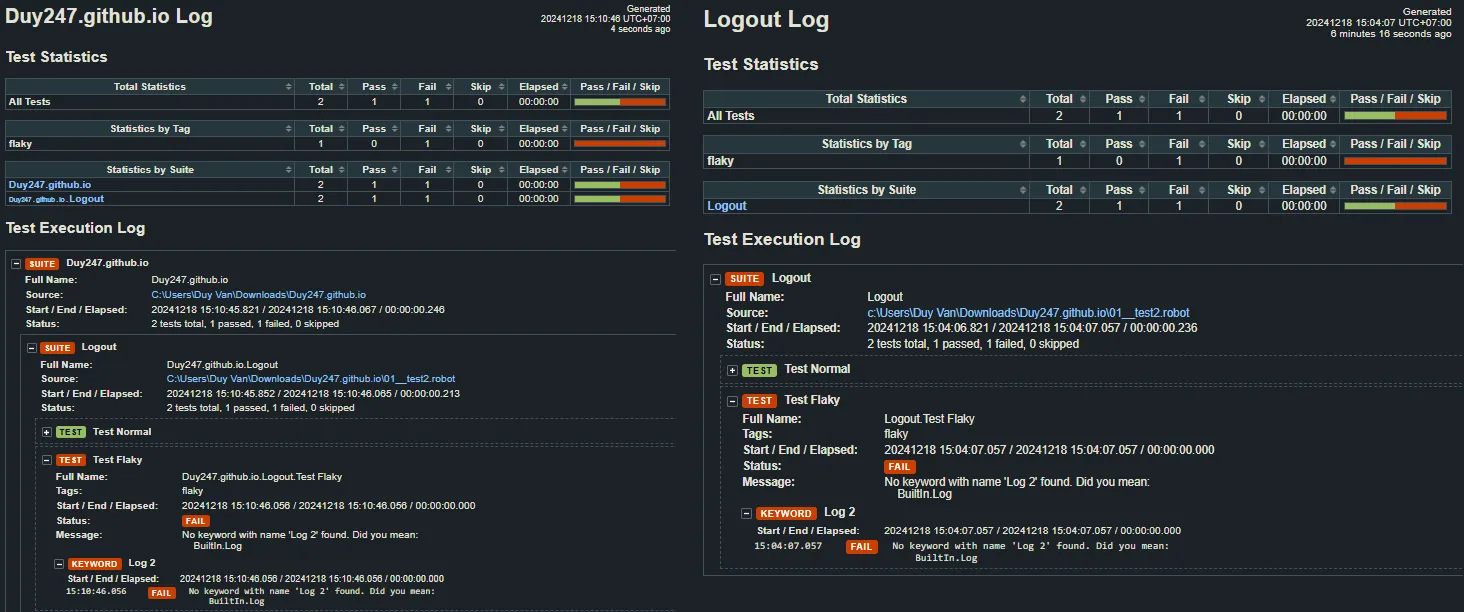
Logs from two run styles
Both log.html files identify Log 2 as the error: I put Log and 2 too close together, so Robot Framework interpreted Log 2 as one keyword. Long errors may be shortened in report.html, while log.html displays the full message.
The quickest way to understand an error is to inspect log.html and report.html. Syntax errors can often be spotted even faster through language highlighting in the IDE.
A test-case error may be caused by incorrect code or by a problem in the test logic.
Exceptions
An Exception is the broader cause of a failed test case; it includes Errors.
Possible causes include:
- An error in the test case.
- Bad test data, an incorrect import or incorrect usage.
- A keyword problem: a wrong name or a keyword that does not exist.
- A library problem: a library was not imported or was imported incorrectly.
- A real product bug.
The message helps us identify the cause. Usually we work from the top of the chain down before deciding that the product is actually broken.
Handling exceptions
By default, when a keyword inside a test case or larger keyword fails, that larger keyword or test case fails immediately and later keywords do not run. Sometimes our test is designed differently, so Robot offers several choices.
Using keywords
Run Keyword And Expect Error
Run Keyword And Expect Error runs another keyword and waits for it to fail. If it does fail, this keyword passes; if it succeeds, this keyword fails.
*** Test Cases ***
Test Run Keyword And Expect Error
    Run Keyword And Expect Error    PREFIX:Message    Keyword
The message can use the prefixes EQUALS, STARTS or REGEXP. EQUALS compares the whole exception message:
*** Test Cases ***
Test Run Keyword And Expect Error
    Run Keyword And Expect Error    EQUALS:No match for '//input[@type="text"]'    Keyword
This expects that exact message, for example when the element at //input[@type="text"] cannot be found.
STARTS compares from the beginning, useful when the exception type is known but the rest of the message varies:
*** Test Cases ***
Test Run Keyword And Expect Error
    Run Keyword And Expect Error    STARTS:ValueError:    Keyword
This accepts any ValueError message. REGEXP matches a regular-expression pattern, so it can find a pattern in the middle or end of a message:
*** Test Cases ***
Test Run Keyword And Expect Error
    Run Keyword And Expect Error    REGEXP:.*'//input[@type="text"]'.*    Keyword
This catches any exception whose message contains that XPath. The prefix can be omitted. To ignore the message and only require a failure, use *; ? matches one character and [chars] matches one of the listed characters.
*** Test Cases ***
Test Run Keyword And Expect Error
    Run Keyword And Expect Error    *    Keyword
Run Keyword And Ignore Error
This runs a keyword and ignores most errors. Invalid syntax, timeouts and fatal exceptions still fail; other failures are ignored and the wrapper passes.
*** Test Cases ***
Test Run Keyword And Ignore Error
    Run Keyword And Ignore Error    Keyword
Run Keyword And Continue On Failure
Normally a failed child keyword stops its parent keyword or test case. This wrapper marks the keyword as failed but continues with later keywords:
*** Test Cases ***
Test Run Keyword And Continue On Failure
    Run Keyword And Continue On Failure    Keyword
Try/Except
Like Python, Robot Framework has Try/Except. It can catch a block containing several keywords, rather than only one as with Run Keyword...:
*** Test Cases ***
Example
    TRY
        Keyword 1
        Keyword 2
    EXCEPT    Exception
        Keyword 3
    END
    Keyword 4
If both keywords pass, Keyword 3 does not run and Keyword 4 continues. If either fails with the specified Exception, Keyword 3 runs and then Keyword 4. If the message does not match, the exception remains unhandled and Keyword 4 does not run.
Several exceptions can be handled:
*** Test Cases ***
Example
    TRY
        Keyword 1
        Keyword 2
    EXCEPT    ValueError
        Keyword 3
    EXCEPT    KeyError
        Keyword 4
    END
    Keyword 6
Keyword 3 handles ValueError, Keyword 4 handles KeyError, and Keyword 6 runs when both keywords pass or either exception is handled. To catch everything, omit the exception:
*** Test Cases ***
Example
    TRY
        Keyword 1
        Keyword 2
    EXCEPT
        Keyword 3
    END
    Keyword 4
Invalid syntax cannot be caught with Try/Except; it fails immediately.
Exception matching also supports GLOB (*, ?, [chars]), regular expressions, starts-with matching and literal matching:
*** Test Cases ***
Example
    TRY
        Keyword 1
    EXCEPT    ValueError: *   type = GLOB
        Keyword 3
    EXCEPT    [Ee]rror ?? occurred *    type=GLOB
        Keyword 4
    EXCEPT    [Ee]rror \\d+ occurred    type=Regexp
        Keyword 5
    EXCEPT    ValueError:    type=start
        Keyword 6
    EXCEPT    ValueError: invalid literal for int() with base 10: 'ooops'    type=LITERAL
        Keyword 7
    END
    Keyword 8
For the details, see matching errors using patterns.